
Fill every visit, and know when one slips.
Build the week, post open shifts, adjust on the fly, and watch visit status as it happens, with EVV exceptions and time approvals in the same place.

The schedule changes faster than the phone tree.
“A 6 a.m. call-out wrecks the morning.”
Finding cover means calling down a list.
“I hear about late visits from the family.”
Without a live view, delays surface too late.
“Approvals pile up at the end of the period.”
Every visit gets checked line by line.
A coordinator’s day, hour by hour.
How the schedule, the field, and approvals stay in sync.
- 6:30 a.m.
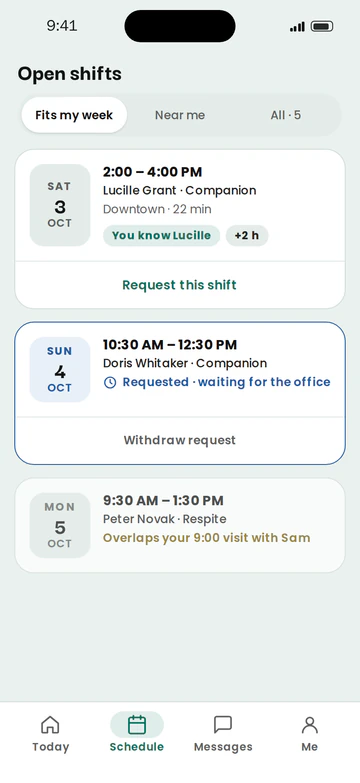
Cover a call-out.
Post the visit as an open shift. Available caregivers see it in the app and can pick it up.
- Open shifts in the caregiver app
- Schedule updates as shifts are filled
- 8:00 a.m.
Adjust the week.
Move a visit or change a caregiver, and the change reaches the caregiver’s phone.
- Week view by caregiver and client
- Recurring visits
- Changes synced to the app
Week view by caregiver and client01Recurring visits02Changes synced to the app03 - 9:15 a.m.
Watch visits start.
See who’s on the clock, and catch late or missed clock-ins as they happen.
- Live now view
- Late and missed clock-ins on the dashboard
Live now view01Late and missed clock-ins on the dashboard02 - 11:00 a.m.
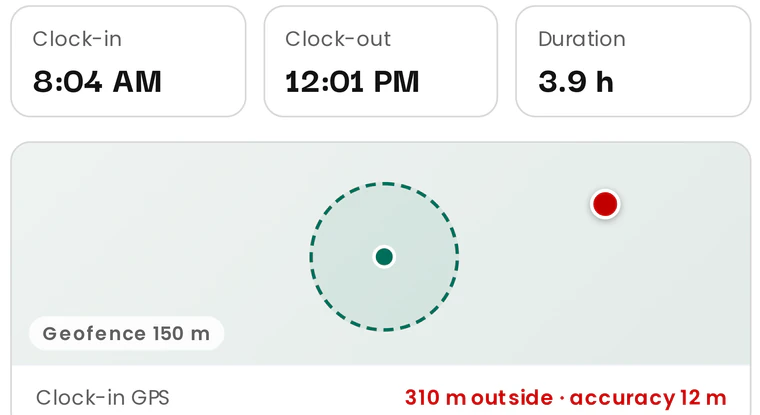
Resolve an EVV exception.
Review a late, missed, or out-of-area visit, and record the reason with the visit.
- Exception queue
- Reason recorded with the visit
- Audit trail
- Friday
Approve the week.
Clean visits are ready to approve, so your time goes to the exceptions.
- Approve by exception
- Approved time ready for payroll
Approve by exception01Approved time ready for payroll02


A schedule that keeps up with the day.
Results depend on your agency’s processes and adoption. We don’t publish figures we haven’t measured.
Faster cover
Open shifts reach caregivers directly.
Earlier warning
Late and missed clock-ins surface as they happen.
Shorter approvals
Exceptions get attention, clean visits don’t need it.
Explore further
How do caregivers find out about changes?
Schedule changes are synced to the TimeGrid Care app on the caregiver’s phone.
Can caregivers pick up open shifts?
Yes. Open shifts appear in the app, and caregivers can pick them up.
What happens when a caregiver is late?
Late and missed clock-ins appear on the dashboard and in the exception queue for review.
Can I approve many visits at once?
Clean visits are ready to approve, so you spend your time on exceptions. Ask us in a demo how approvals work for your volume.
See your schedule in TimeGrid Care.
Book a demo to walk through open shifts, live visit status, and approvals.
Founding agencies join at $6 per active caregiver per month, locked for 12 months from go-live.