
See the whole agency, without chasing reports.
TimeGrid Care gives agency leaders one connected view of visits, staffing, compliance, and authorizations, so decisions start from today’s data instead of last week’s spreadsheet.

Running an agency shouldn’t mean assembling the picture by hand.
“I find out about problems after they’ve cost us.”
Missed visits, expired credentials, and exhausted units often surface days later.
“Every system tells part of the story.”
Scheduling, EVV, documentation, and billing live in different places, so no one sees all of it.
“Growth adds admin, not capacity.”
Each new client, caregiver, or location adds more manual coordination.
From the morning check-in to the weekly review.
How leaders can use TimeGrid Care across a typical week.
- Every morning
Start with what needs attention.
The dashboard leads with late and missed clock-ins, open items, and exceptions across the agency.
- Needs-attention queues
- Today’s visits at a glance
- Late and missed clock-ins
Needs-attention queues01Today’s visits at a glance02Late and missed clock-ins03 - During the day
Know who’s working, and where.
A live view of who’s on the clock, without calling the office.
- Live now view
- Visit status as it happens
Live now view01Visit status as it happens02 - Weekly
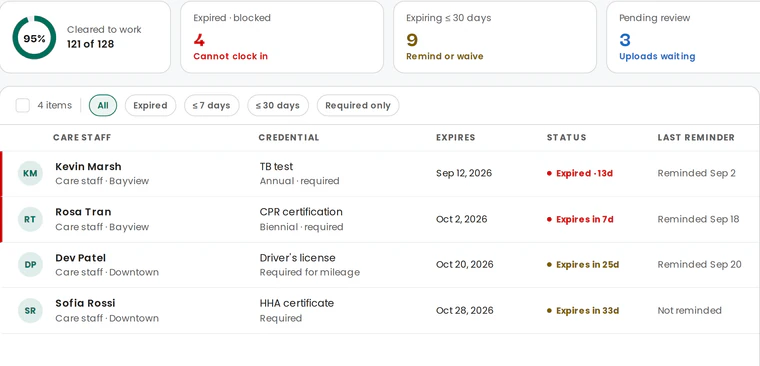
Compliance and authorizations in view.
See who’s cleared to work, what’s expiring, and how authorized units are being used.
- Cleared-to-work status
- Expiring credentials
- Units used and remaining per payer
- As you grow
More locations, the same platform.
Add locations and assign roles for coordinators, HR, and administrators, with access matched to each role.
- Multiple locations in one organization
- Role-based access with MFA
- Audit logging
Multiple locations in one organization01Role-based access with MFA02Audit logging03

Leadership built on current information.
Results depend on your agency’s processes and adoption. We don’t publish figures we haven’t measured.
One view of operations
Visits, staffing, compliance, and authorizations come from the same data.
Problems surfaced earlier
Exceptions and expiring credentials show up while there’s time to act.
Room to grow
New clients, caregivers, and locations join the same workflows.
Explore further
Can I see every location in one place?
Yes. Organizations with several locations run them in one TimeGrid Care organization, with roles controlling what each person can see.
Does TimeGrid Care replace our separate tools?
TimeGrid Care brings scheduling, EVV, care documentation, compliance, and billing exports together in one platform. In a demo, we’ll map it against the tools you use today.
What does it cost?
Founding agencies pay $6 per active caregiver per month, locked for 12 months from go-live. Larger organizations get custom pricing through our sales team.
How long does it take to go live?
Most agencies are live and verifying visits within a week, with configuration, data migration, and training from our team.
Lead from one connected view.
Book a demo to see the dashboard, compliance, and authorization views with workflows like yours.
Founding agencies join at $6 per active caregiver per month, locked for 12 months from go-live.